AI Colorize Old Photos
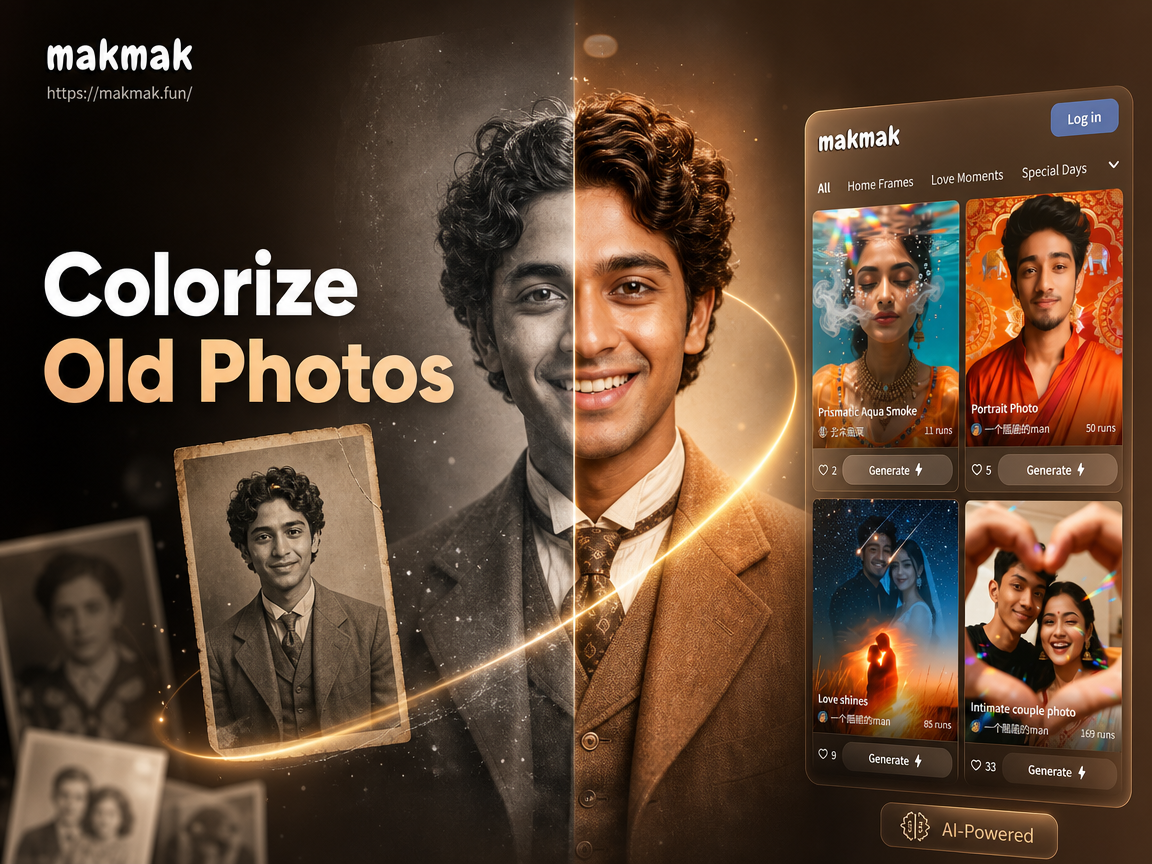
Historical Color Palettes & Styles
Choose from AI colorization filters designed for different eras and photo types, from Victorian portraits to mid-century snapshots.
How AI Colorizes Your Old Photos
Our AI doesn't just add random color. It intelligently analyzes each element of your photo to apply historically plausible and visually stunning hues.
Smart Facial & Skin Tone Detection
The AI identifies faces and applies natural, varied skin tones. It differentiates between hair, eyes, and lips for a lifelike portrait restoration.
Smart Facial & Skin Tone Detection
The AI identifies faces and applies natural, varied skin tones. It differentiates between hair, eyes, and lips for a lifelike portrait restoration.
Context-Aware Environment Coloring
Based on textures and shapes, the AI colors skies blue, grass green, and bricks red. It understands the context of the scene for realistic results.
Context-Aware Environment Coloring
Based on textures and shapes, the AI colors skies blue, grass green, and bricks red. It understands the context of the scene for realistic results.
Period-Accurate Clothing & Material Hues
Our AI references historical color palettes to suggest plausible colors for fabrics, wood, metal, and other materials in your old photos.
Period-Accurate Clothing & Material Hues
Our AI references historical color palettes to suggest plausible colors for fabrics, wood, metal, and other materials in your old photos.
Gallery of Colorized Memories
See the transformative power of AI colorization. These before-and-after examples show how black and white photos regain their emotional depth and vibrancy.
How to Colorize Old Photos with AI
Restoring your family history in color is simple. Follow these three easy steps directly in the makmak mobile app.

Step 01.
Download the free makmak app from Google Play. Open the app and tap the upload button to select a black and white photo from your gallery.

Step 02.
Navigate to the colorization filters. Browse styles like Vintage Portrait, Historical Scene, or Natural Color. Select one that matches your photo's era.

Step 03.
Tap Generate. In seconds, view your colorized photo. Save the high quality result to your device or share the vibrant memory with family.
Stories from Users Who Colorized Their History
Sarah K.
I had boxes of old WWII letters with faded photos. Using makmak, I colorized my grandfather's portrait. Seeing his uniform and eyes in color for the first time was incredibly moving for our whole family.
David L.
As a genealogy buff, I present findings to my relatives. Colorizing 19th-century ancestor photos with this AI makes the presentations unforgettable. The skin tones look so natural, it bridges the generational gap instantly.
Elena M.
I restore old photos professionally. This app is my secret weapon for initial colorization tests. It's fast, gives me a fantastic color base to work from, and the results impress my clients every time.
Marcus T.
I used makmak to colorize historical photos for my classroom presentations. Seeing the Great Depression or Civil Rights era in color makes history tangible for my students. It's an amazing educational tool.
Sarah K.
I had boxes of old WWII letters with faded photos. Using makmak, I colorized my grandfather's portrait. Seeing his uniform and eyes in color for the first time was incredibly moving for our whole family.
David L.
As a genealogy buff, I present findings to my relatives. Colorizing 19th-century ancestor photos with this AI makes the presentations unforgettable. The skin tones look so natural, it bridges the generational gap instantly.
Elena M.
I restore old photos professionally. This app is my secret weapon for initial colorization tests. It's fast, gives me a fantastic color base to work from, and the results impress my clients every time.
Marcus T.
I used makmak to colorize historical photos for my classroom presentations. Seeing the Great Depression or Civil Rights era in color makes history tangible for my students. It's an amazing educational tool.
Sarah K.
I had boxes of old WWII letters with faded photos. Using makmak, I colorized my grandfather's portrait. Seeing his uniform and eyes in color for the first time was incredibly moving for our whole family.
David L.
As a genealogy buff, I present findings to my relatives. Colorizing 19th-century ancestor photos with this AI makes the presentations unforgettable. The skin tones look so natural, it bridges the generational gap instantly.
Elena M.
I restore old photos professionally. This app is my secret weapon for initial colorization tests. It's fast, gives me a fantastic color base to work from, and the results impress my clients every time.
Marcus T.
I used makmak to colorize historical photos for my classroom presentations. Seeing the Great Depression or Civil Rights era in color makes history tangible for my students. It's an amazing educational tool.
Colorize Photos on Your Phone
Carry a photo restoration studio in your pocket. Download makmak and transform any black and white snapshot into a colorful memory in under a minute.

AI Photo Colorization Questions Answered
Get all the details on how AI colorize old photos works, what to expect, and how to get the best results with your precious memories.
More Topics You May Like
Explore more topics you may like and discover fresh ideas tailored to your interests.
Slim Your Look Instantly with AI
Craft Your Brand: AI Logo Maker in Minutes
Clean Your Photos Instantly: Effortless Filter Removal

Create Your Own 3D PUBG Logo Instantly
Slim Your Look Instantly with AI
Craft Your Brand: AI Logo Maker in Minutes
Clean Your Photos Instantly: Effortless Filter Removal
Create Your Own 3D PUBG Logo Instantly
See Your History in a New Light
Don't let your memories fade in black and white. Experience the emotional impact of seeing your family's past in vivid, realistic color. The process is simple, fast, and completely free to try.
See Your History in a New Light
Don't let your memories fade in black and white. Experience the emotional impact of seeing your family's past in vivid, realistic color. The process is simple, fast, and completely free to try.